Students must start practicing the questions from CBSE Sample Papers for Class 10 Computer Applications with Solutions Set 8 are designed as per the revised syllabus.
CBSE Sample Papers for Class 10 Computer Applications Set 8 with Solutions
Time Allowed: 2 hours
Maximum Marks: 50
General Instructions:
- This Question Paper has 5 Sections A-E.
- All Questions are compulsory. However, internal choices have been provided in some of the questions.
- Section A has 12 questions carrying 01 mark each.
- Section B has 7 Short Answer (SA-I) type questions carrying 02 marks each.
- Section C has 4 Short Answer (SA-II) type questions carrying 03 marks each.
- Section D has 1 Long Answer (LA) type question carrying 04 marks.
- Section E has 2 Source based /Case-based /Passage based Questions carrying 04 marks each.
SECTION – A (12 Marks)
(All questions are compulsory)
Question 1.
…….. is a Protocol used for transmitting files over Internet. [1]
(a) HTTP
(b) FTP
(c) both (a) and (b)
(d) None of the above
Answer:
(b) FTP
Explanation:
FTP (File Transfer Protocol) is a set of rules for exchanging files over any network (internet or intranet).
HITP (Hypertext Transfer Protocol) is a set of rules for transferring hypertext i.e. text, image, graphic, sound, video etc. on WWW (World Wide Web).
Question 2
………. is an e-mail client. [1]
(a) MS-Word
(b) MS-Outlook
(c) MS-Excel
(d) None of these
Answer:
(b) MS-Outlook
Explanation:
An e-mail client is a front end application used for managing e-mail.
An e-mail can be sent and received by either creating a web based e-mail account or using an email-client

Question 3.
To access a website one needs to enter the URL of the website. URL stands for: [1]
(a) Uniform Reform Locator
(b) Universal Resource Locator
(c) Uniform Resource Locator
(d) Universal Reform Locator
Answer:
(c) Uniform Resource Locator
Explanation: URL is the unique address of a web page on the internet
A URL takes the form: type//address/path. Here type specifies the type of server, address is the address of the fIle and path specific the location of the file on the server.
Question 4.
The NeGP has been formulated by the government of India to promote ……….. [1]
(a) Swacch Bharat abhiyaan
(b) e-Governance
(c) Aayushmaan Bharat scheme
(d) Ujjwala yojna
Answer:
(b) e-go vernance
Explanation:
e-govemance refers to the application of electronic means to governance either in government operations or in communication between government and citizens or businesses.
e-governance plans in Indio include projects like Consular Passport and VISA divrsion, income tax portal, NPI, RTI portal etc.
Question 5.
HTML tag to draw horizontal line : [1]
(a) <hl>
(b) <hr>
(c) <hline>
(d) None of these
Answer:
(b) <hr>
Explanation:
<hr> tag is an empty tag. Following attributes are used with it to change the appearance of horizontal rule in the webpage.
- Align: Sets the alignment of the horizontal rule. The values are LEFT RIGHT and CENTER
- Noshade: The horizontal rute appears as 20 in one solid colour.
- Size: It specifies the height of the rule.
- Width: It specifies the width of the element
Question 6.
Consider the following code:
<img src=”Computers.jpg” width=”…….. “height=”……….”>
Fill in the blanks to set the image size to be 250 pixels wide and 400 pixels tall. [1]
(a) 250, 400
(b) 400, 250
(c) <250><400>
(d) <400><250>
Answer:
(a) 250, 400
Explanation:
The WIDTH and HEIGHT attributes of <IMG> tag specify the horizontal width and vertical height of an image in webpage.
Question 7.
The elements of HTML are called ……… [1]
(a) Attributes
(b) Code
(c) Tags
(d) Statements
Answer:
(c) Tags
Explanation: A tag is an HTML command that indicates how various parts of a web page should be displayed.
Question 8.
Bgcolor is a/an ………. [1]
(a) Element
(b) Tag
(c) Attribute
(d) None of above
Answer:
(c) Attributes.
Explanation:
Attributes are always specified in the start or opening tog and usually consist of name/value pairs like name=”value” Attribute values should always be enclosed in quotation marks.
Question 9.
Kritika is designing a table for a web page. Which tag should she use to specify the cell values? [1]
(a) <th>
(b) <td>
(c) <tr>
(d) <cell>
Answer:
(b) <td>
Explanation:
<th> tag specifies a header row, <tr> specifies a row and < td> tag is used to specify a data cell There is no tag as <cell>.
<table> tag in HTML is used to define a table. Row of the table are defined using the <tr> tag and each data cell within the row is specified using <td>.
Question 10.
A software that is free but not freeware is called: [1]
(a) Proprietary software
(b) Share ware
(c) Public domain software
(d) copyrighted software
Answer:
(c) Public domain software
Explanation:
A Public Domain Software is the one which has completely no ownership and none kind of license is associated with it.
Caution
Public domain software is often confused with freeware. However a Public Domain Software has no licensed attached whereas a freeware is copyrighted.
Questions No. 11 and 12 are Assertion and Reason types. Each question consists of two statements, namely, Assertion (A) and Reason (R). Select the most suitable option considering the Assertion & Reason.
Question 11.
Assertion (A): A web application is a software that runs in your web browser.
Reason (R): Browsers are intended to facilitate access of resources on the World Wide Web.
(a) Both Assertion (A) and Reason (R) are true and Reason (R) is a correct explanation of Assertion (A).
(b) Both Assertion (A) and Reason (R) are true and Reason (R) is not a correct explanation of Assertion (A).
(c) Assertion (A) is true and Reason (R) is false.
(d) Assertion (A) is false and Reason (R) is true. [1]
Answer:
(a) Both Assertion (A) and Reason (R) are true and Reason (R) is a correct explanation of assertion (A).
Explanation:
A web browser is an application that helps in accessing various sites on the World Wide Web by entering their URL in the address bar. Web applications are delivered to the users through the World Wide Web.
Question 12.
Assertion (A): POST sends the form information in the HTTP environment.
Reason (R): <FORM>tag starts a form to collect user input.
(a) Both Assertion (A) and Reason (R) are true and Reason (R) is a correct explanation of Assertion (A).
(b) Both Assertion (A) and Reason (R) are true and Reason (R) is not a correct explanation of Assertion (A).
(c) Assertion (A) is true and Reason (R) is false.
(d) Assertion (A) is false and Reason (R) is true. [1]
Answer:
(b) Both Assertion (A) and Reason (R) are true and Reason (R) is not a correct explanation of assertion (A).
Explanation:
<form> tag starts a form to collect the user input. This input is sent to the HTTPS environment using the POST attribute. Here (A) is the reason for (R) and not vice versa.
SECTION – B (14 Marks)
(2 marks each)
Question 13.
Tishya is trying to explain the difference
between 3G and 4G mobile technologies to her grandfather. Write any two points of differences between 3G and 4G mobile technology. [2]
Answer:
| 3G | 4G |
| (1) 3G stands for third generation mobiole technology. | 4G stands for fourth generation mobile technology. |
| (2) 3G supports maximum download rate of 21 Mbps | 4G supports the data download rate of around 1 Gbps. |
| (3) 3G employs packet switching technique | 4G employs message switching techniques |
Question 14.
What is e-commerce? Write any two preventive measures to be taken for secure online transactions. [2]
Answer:
e-commerce: e-commerce or electronic commerce refers to commercial transactions conducted electronically on the Internet. It includes buying and selling of goods or services using the internet and the transfer of money and data to execute these transactions. Two preventive measures for secure online transaction:
- Never share OTP with anyone.
- Before making an online payment, ensure that connection is secure (HTTPS)
OR
What is e-learning? Explain any two merits of e-learning. [2]
Answer:
e-learning is learning through the courses which are delivered online.
Benefits:
- Self Paced (Learn at your speed).
- We can attend classes at any time and any where.
Question 15.
Write a short note on SMS.
Answer:
SMS stands for Short Message Service. It is text messaging service used on cellular networks for messages upto 160 characters. Longer messages are automatically split into multiple messages. It does not require the device to be active and within range. The messages are stored for several days until the device becomes active and within range.
Question 16.
Define Intellectual Property Rights
Answer:
Intellectual Property Rights are the rights given to creators for creations of their minds. Intellectual property rights are the rights of the owner or the developer of the information. And it is the owner or the developer who has the right to decide how much of the information is to be exchanged, shared or distributed among the masses. Also it gives the right to the owner to decide the price for doing so.
OR
Define Plagiarism. [2]
Answer:
Plagiarism is taking credit of ideas/words of another person. Plagiarism is stealing someone else’s intellectual work and
representing it as your own work without citing or giving credit to the creator of the information.
Question 17.
What is a Hypertext link? Give the name and the syntax of the HTML Tag which is used for creating a Hypertext Link. [2]
Answer:
Hypertink links HTML elements (text and/or image) to another document or new section within the current document. When a test is used to creat a hypertink it is called hypertext link.
The tag used to creats hyperlink.
Name: anchor tag, Syntax <a href=”Link Address”>Hyperlink Text</a>
Question 18.
Match the following HTML tags with their attributes to help Anubhuti write her HTML code.
| (A) <form> | (I) href |
| (B) <video> | (II) action |
| (C) <a> | (III) size |
| (D) <hr> | (IV) height |
Answer:
(A) – (II),
(B) – (IV),
(C) – (I),
(D) – (III)
Explanation:
<form> tag is used to take input from the user and action attribute specifies the URL of the script that receives data from this form.
<video> tag is used to add video to a web page. The size of the area in which the video will be played is specified using height and width attribute.
<a> is the anchor tag and is used to create a link to another location of the same document or to another documents. Href is hypertext reference and is used to specify the target location of the link.
<hr> is horizontal rule and is used to visually separate different sections of the web page. Size attribute specifies the thickness of the horizontal rute.
OR
What is the use of <sub> and <sup> tag? Explain with a suitable example. [2]
Answer:
<sub> : defines subscripted text
<sup> : defines superscripted text
Example:
To write a2 : a<sup>2</sup>
To write CO2 : CO<sub>2</sub>
Explanation:
<sub> tag defines subscripted text. It appears half a character below the normal line. These can be used to write chemical formulas like H2O. H<sub>2</sub>O
<sup> tag defines superscripted text. It appears half a character above the normal line. ft can be used to write exponent values like 10<sup>-5</sup> 10<sup>-5</sup>
Question 19.
What are the roles of the following attributes
(A) Rowspan
(B) Colspan [2]
Answer:
(A) Rowspan attribute is used to specify the number of rows a cell should span while defining a table, it is an attribute of<td> tag.
(B) colspan attribute is used to define the number of columns a cell should span in a table. It is an attribute of<td> tag.
Explanation:
The rowspan and colspan attributes are used with the <TD> tag while creating tables in the HTML document. These are used to specify the number of rows and columns a cell should span. The rowspan attribute is for rows and colspan is
for columns. These attributes nave numic values. For ex. Colspan =5 will span 5 columns
SECTION – C (12 Marks)
(3 marks each)
Question 20.
Reyan is web designer and currently designing a web page for a Packaging company. He wants that all the tables he designs in the web page should have the image “packets.jpg” as background and repeated horizontally. Also all the text in tables should be displayed in orange colour. He is unable to apply these settings with usual HTML tags. How can he achieve this? Suggest him the way and also write code for him. [3]
Answer:
Reyan can use internal style sheet to apply these settings.
Code
<html>
<head>
<style type="text/css">
Table {background-image : "packets.jpg”; background-repeat: repeat-x text color="orange"}
</style>
</head>
<body>
<table>
<tr>
<th> Item Code <Idi>
<th> Item Name 4th>
<th>Price</th>
<tr>
<td> 102</th>
<td>Plastic</td>
<td>50.00</td>
</tx>
</table>
</body>
</html>
Question 21.
Abhimanyu a web designer wants to add an audio file “notes.wav” in his web page. He wants to display the message “ Your Browser does not support the AUDIO element” in case the browser does not support the audio file type. [3]
Answer:
HTML code to add the audio file is:
<audio>
<source src = "notes.wav" controls type="audio/wav">Your Browser does not support the AUDIO element
</audio>
Question 22.
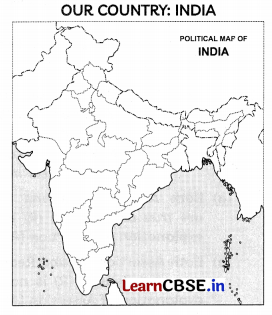
India is spread over a large geographical area. In terms of area, it is the 7th largest country while in terms of population, it is the 2nd Largest country in the world.
Write the HTML code to design the above-shown web page in which the image named ‘lndia.jpg’ should be placed at the center and act as a link to another page states. html
Answer:
<html>
<body bgcolor="yellow”>
<center>
<h1> OUR COUNTRY: INDIA </h1>
<a href="states.html"> <img src ="india.jpg"> </a>
</center>
<p>
India is spread over a large geographical area. In terms of area, it is the 7<sup>th</sup> largest country white in terms of population, it is the 2<sup>nd</sup> largest country in the world. </font></p>
</body>
</html>
OR
Observe the screen shot of the web page given below. Write its html code.
Our Country: India
India is spread over a large geographical area. In terms of area, it is the 7th largest country while in terms of populution it is the 2nd largest country in the world. Some facts about India are as follows
- Area: Approx 3.28 million sq.km
- North to South extension: Approx 32,00 km
- East to West extension : Approx 2900 km [3]
Answer:
<html>
<body>
<center>
<h1> Our Country : India</h1>
</center>
<p>
India is spread over a large geographical area, In terms of area, it is the 7<sup>th</sup> largest country while in terms of
population, it is the 2<sup>nd</sup> largest country in the world. Some facts about India are as follows:
<p>
<ul>
<li>Area : Approx 3.28 million sq. km </li>
<li>North to South extension :Approx 3,200 km</li>
<li>East to West extension :Approx 2900 km</li>
</ul>
</body>
</html>
Question 23.
What is digital divide? Write any two reasons for digital divide in India. [3]
Answer:
Digital. Divide refers to the differing amount of information between those who have access to ICT and those who dont have access to it.
Reasons for Digital divide are:
- Due to the unequal distribution of wealth, poverty is higher in rural areas
- Less Literacy rate in rural India
SECTION – D (4 Marks)
(4 marks each)
Question 24.
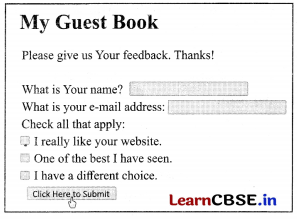
Create a form as given below using html.
Answer:
<html>
<body>
<h1> My Guest Book</h1>
<p>Please give us Your feed back. Thanks</p>
<form>
What is Your name?
<input type = text name = “name">
<br>
What is your e-mail address: <input type = text name = “add">
<br>
Check all that apply:
<br>
<input type = checkbox name = “apply value = "like">I really like your web site.
<br>
<input type = checkbox name = "apply value = "best">One of the best I have seen.
<br>
<input type = checkbox name = "apply” value = "diff">I have a different choice.
<br>
<input type = "Submit" value = "Click Here to Submit">
</body>
</html>
OR
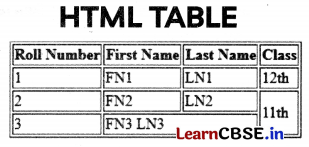
Write the HTML code to design the web page as shown below. [4]
Answer:
<html>
<head>
</head>
<body>
<h1>HTML TABLE</h1>
<table border="1">
<tr>
<th>Roll Number</th>
<th>First Name</th>
<th>Last Name</th>
<th>Class</th>
<tr>
<td> 1</td>
<td>FN1</td>
<td>LN1</td>
<td>12th</td>
<tr>
<td>2</td>
<td>FN2</td>
<td>LN2</td>
<td rowspan="2">11th</td>
</tr>
<tr>
<td>3</td>
<td colspan="2">FN3LN3</td>
</table>
</body>
<html>
SECTION – E (8 Marks)
(4 marks each)
Question 25.
Case Study 1
Mr. Harish, an accountant, works in an IT firm and due to the pandemic, has been asked to work from home. He has set up his online office at his home. He has purchased a laptop, web camera and other accessories. Now he has started working from home and performs his various duties online.
(A) Mr. Harish wants to hold an online meeting with the company’s client such that he can interact as well as see them. Which web service should he avail? [1]
(B) Mr. Pritish wants to send an email to Harish what type of application is required for e-mail communication? [1]
(C) In order to gather some information on latest accounting trends, Mr. Harish has to do some research. How can he find the required sites. [1]
(D) Since Mr. Harish’s laptop has some very sensitive company data he is always worried about his system being hacked, whenever he surfs the internet. How can he ensure saftety while online? [1]
Answer:
(A) He should use video conferencing in order to conduct an online meeting.
Explanation:
Video conferencing is a type of telecommunication tool in which two or more people are engaged in an audio visual call
(B) For email communication either an e-mail client or a web based e-mail service is required.
(C) Search Engine/Web browser can be used to search required information on the internet.
Explanation:
Google, Yahoo and Bing are examples of search engine.
(D) To ensure safety, while online Mr. Harish should look for https in the URL of every website he visits or look for a padlock sign against the URL in address bar of the browser.
Question 26.
Case Study 2
Harshit is an entrepreneur who has started manufacturing of toys. He wants to expand his customer base. He has some queries about actual execution of his plans. Answer these.
(A) How can he reach the customers world wide? [1]
(B) What are the safety issues related to Harshit’s plan? Write any one. [1]
(C) State one ethic related to the activity in (A) that Harshit must follow. [1]
(D) How can Harshit prevent frauds related to activity in (A)? [1]
Answer:
(A) He can start e-commerce
(B) Online Fraud
(C) Privacy of consumer information is one of the main ethics an e-commerce merchant should follow.
(D) Strong security mechanisms must be followed in payment gateways to safeguard user data and prevent e-commerce frauds.