Students must start practicing the questions from CBSE Sample Papers for Class 10 Computer Applications with Solutions Set 7 are designed as per the revised syllabus.
CBSE Sample Papers for Class 10 Computer Applications Set 7 with Solutions
Time Allowed: 2 hours
Maximum Marks: 50
General Instructions:
- This Question Paper has 5 Sections A-E.
- All Questions are compulsory. However, internal choices have been provided in some of the questions.
- Section A has 12 questions carrying 01 mark each.
- Section B has 7 Short Answer (SA-I) type questions carrying 02 marks each.
- Section C has 4 Short Answer (SA-II) type questions carrying 03 marks each.
- Section D has 1 Long Answer (LA) type question carrying 04 marks.
- Section E has 2 Source based /Case-based /Passage based Questions carrying 04 marks each.
SECTION – A
(All questions are compulsory)
Question 1.
………….. is the protocol used for downloading a file. [1]
(a) TCP
(b) FTP
(c) IP
(d) SMTP
Answer:
(b) FTP
Question 2.
Which of the following is a software based service that takes place when two electronic devices connect via internet and communicate over WWW? [1]
(a) Chat
(b) E-mail
(c) Video Conferencing
(d) All of the above
Answer:
(d) All of the above
Explanation: Web services are the software-based services provided when two electronic devices connected through a network, communicate over WWW. The types of services available on the internet are email, searching desired information, video conferencing, storing or retrieving files, participating in discussion forums, etc.
Question 3.
A collection of the pages linked together in a random order is: [1]
(a) A website
(b) A web server
(c) A search engine
(d) A web browser
Answer:
(a) A website
Question 4.
A ………. is a website or a part of some online service that allows several users of common interests to login simultaneously and communicate with each other. [1]
(a) Chat room
(b) social networking
(c) WWW
(d) Blog
Answer:
(a) Chat room

Explanation: Chat is the process of communicating or interacting or exchanging messages in textual form over the internet.
Question 5.
Tag (s) required to create Description lists in HTML: [1]
(a) <DL>
(b) <DT>
(c) <DD>
(d) All of these
Answer:
(d) All of the these
Explanation: Definition lists are defined using <DL> tag. <DT> tag defines the definition term and the definition description of the term is given with <DD> tag.
Question 6.
<HR> stands for ………. [1]
(a) High Row
(b) Horizontal Rule
(c) Horizontal Row
(d) High Rule
Answer:
(b) Horizontal Rule.
Explanation: The <HR> tag renders a horizontal line spread across the width of the browser window. Horizontal rules give a way to separate sections of the document visually.
Question 7.
<a> tag is used to ………. [1]
(a) Insert an image
(b) Give a heading
(c) Create linking
(d) Both (a) and (c)
Answer:
(c) Create linking
Explanation: The <a> anchor tag in HTML helps the user to incorporate a hyperlink into the web browser which helps to link a hyper text file to another document, file or location within the web browser.
A hyperlink is typically activated by clicking on a highlighted word.
Question 8.
A table can be made attractive by using background colours or patterns. Which of the following attribute is used to do so? [1]
(a) background
(b) bgcolor
(c) background image
(d) Both (a) and (b)
Answer:
(d) Both (a) and (b)
Explanation: Background attribute is used to apply an image or picture as a background of a table and bgcolor attribute is used to apply a background colour to the table.
Question 9.
Identify the structural tag from the following. [1]
(a) <title>
(b) <p>
(c) <hr>
(d) <table>
Answer:
(a) <title>
Explanation: HTML document is created using four essential eLements called structural tags. These are <html>, <head>, <titLe> and <body>.
The HTML5 structure consists of the following additional elements:
(1) <!DOCTYPE> tag.
(2) An additional ‘long’ attribute in <HTML> tag.
(3) Additional but optional <meta charsets tag.
Question 10.
………. refers to the act of purchasing only one Ijcensed copy of a software and distributing and loading it onto multiple systems. [1]
(a) Software counterfeiting
(b) Renting
(c) Hard disk loading
(d) Softlifting
Answer:
(d) Softlifting
Explanation: Copying of data or computer software without the owner’s permission is called software piracy. Softlifting is one of its form.
Questions No. 11 and 12 are Assertion and Reason types. Each question consists of two statements, namely, Assertion (A) and Reason (R). Select the most suitable option considering the Assertion & Reason.
Question 11.
Assertion (A): E-Groups create smaller network within a larger one and the users of social network services can create, join, leave and report the groups.
Reason (R): E-Group is a feature provided by an ISP. [1]
(a) Both Assertion (A) and Reason (R) are true and Reason (R) is a correct explanation of Assertion (A).
(b) Both Assertion (A) and Reason (R) are true and Reason (R) is not a correct explanation of Assertion (A).
(c) Assertion (A) is true and Reason (R) is false.
(d) Assertion (A) is false and Reason (R) is true.
Answer:
(c) Assertion (A) is true and Reason (R) is faise.
Explanation: E-Group is a feature provided by many sociaL network services which heips you create, post, comment to and read about the topics of your own interests from the forums.
Question 12.
Assertion (A): The <BODY> tag encloses all the tags attributes and information.
Reason (R): The information given in <BODY>section is displayed in the web page. [1]
(a) Both Assertion (A) and Reason (R) are true and Reason (R) is a correct explanation of Assertion (A).
(b) Both Assertion (A) and Reason (R) are true and Reason (R) is not a correct explanation of Assertion (A).
(c) Assertion (A) is true and Reason (R) is false.
(d) Assertion (A) is false and Reason (R) is true.
Answer:
(a) Both Assertion (A) and Reason (R) are true and Reason (R) is a correct expLanation of Assertion (A).
Explanation: The <BODY></BODY> tag contains all the information to be displayed in the web page. Thus, all the tags and attributes are given in this section of the HTML document.
SECTION – B (14 Marks)
(2 marks each)
Question 13.
Write a note on MMS. [2]
Answer:
MMS or Multimedia Messaging Service is a way to send messages that include multimedia content such as pictures, text, audio, video, to and from a mobile phone over a cellular network. This technology is integrated with SMS service and gets activated whenever required. To send and receive MMS a mobile device with multimedia capabilities is required.
Question 14.
Write any one application each of e-Govemance and e-commerce.
OR
Vani has just started learning about Internet and its advantages. Explain to her the term e-Learning briefly. [2]
Answer:
e-Governance
(1) It enables to fill a visa application form or an application to renew the passport online.
(2) It also enables one to fill and track PAN Card applications and fill income tax returns and TDS returns online.
(3) It allows the general public to get hold of any court judgements, case studies, news etc. over the internet.
e-Commerce
(1) It enables the user to make payments or transfer funds over the internet.
(2) It’s enables users to buy or sell goods or services over the internet, i.e., online shopping.
(Note: Write any one point for each.)
OR
e-learning is the type of Learning that takes place in an electronically simulated environment. e-Learning, web-based training, internet-based training and computer-based training are the next-generation instruction methods being developed today.
e-Learning can be done using an internet connection, a network, and internet, or a storage disk. It offers following benefits to both the teachers and learners.
(1) It is less expensive to provide e-Learning as it is virtually free.
(2) Learners control the amount of time they spent on any particular topic thereby controlling the speed of course coverage.
Question 15.
What is 4G mobile technology? [2]
Answer:
4G is Fourth Generation wireless technology of mobile communications. It is successor of 3G and precedes 5G. It basically defines standard for transmission technology and data speeds. It offers maximum download speeds of 1 Gbps.
Question 16.
What is Copyleft Licence? Give two examples of Copyleft Licence.
OR
Define plagiarism. [2]
Answer:
Copyleft is a technique of granting certain permissions over copyrighted software, thus permitting its free use and same rights being preserved on its derivative works.
Two examples of copyleft license are GNUGeneral Public Licence(GNUGPL) and Mozilla Public Licence 2.0.
OR
Plagiarism means stealing someone else’s intellectual work and representing it or passing it as your own work without citing the source of information for the same.
Question 17.
Rita has just started learning web page designing. Help her in understanding the purpose of <TITLE> tag in web page designing. [2]
Answer:
The <title> tag contains documents title and identifies its content in a global context. The title is typically displayed in the title bar at the top of the browser window, but not inside the window itself. It helps the programmer to give a title to his or her document or web page.
Question 18.
Mr. Gaurav, a web designer in Global Designer Pvt. Ltd., needs to create a web page. Suggest him suitable HTML tag along with required attribute to draw a horizontal line of red colour across three fourth of the browser window. [2]
OR
Observe the screenshot of the web page given below and identify any two main tags of HTML other than the structural tags being used to create the Page. [2]
| FLOWER |
| 1. ROSE |
| 2. LILY |
| 3. LOTUS |
Answer:
To draw a horizontal line of red colour across three fourth of the browser window:
<HR> tag with color and width attribute is used as follows.
<hr color = “RED” width = “75%”>
Caution: <html>, <headxbody> and <title> are structured tags.
OR
Two main tags used are:
(1) <ol> tag with <li> tag.
(2) <h> tag for heading.
Question 19.
Name the following with respect to HTML:
(A) Attribute for changing bullet type of list tag.
(B) Element to create a hyperlink. [2]
Answer:
(A) type attribute.
(B) <a> tag or anchor tag.
SECTION – C
(3 marks each)
Question 20.
Anu a web designer is designing a web page for a leading publication wherein he needs to list the books under various categories. What should he do to attain a uniformity of style in lists of all categories. There are more than twenty categories of the books. He doesn’t want to specify the style details every time. Suggest him a way how he can achieve this. Also help him by writing the code for the same.
He wants all the lists elements to be:
in pink colour,
size- 15 and
font comic sans ms. [3]
Answer:
He should use inline style to specify the style for all unordered lists of this web page.
HTML Code:
<html>
<head>
<style>
ul{ color:pink;font-size:15;font-family :comic sans ms; text-decoration underline}
</style>
</head>
<body>
<h1> Fairy Tales</h1>
<ul>
<li> Alice in Wonderland</li>
<li> Cindrella</li>
</ul>
</body>
</html>
Question 21.
Kamya, a class 10 student is designing a web page about the annual function of her school. She wants to add the audio file of the welcome speech by the Principal on her web page. Help Kaamya by writing the code for the same. The audio file is speech.mp3 and the user must be able to increase and decrease the volume as well as seek and pause the audio. An error message must be displayed if in any case the audio doesn’t play. [3]
Answer:
<audio controls>
<source src =”speech.mp3” type=”audio/ mpeg''>
Audio not supported!
</audio>
Question 22.
Write HTML code to display the unordered list (with square bullets) of two cities “DELHI” and “MUMBAI”. The web page should have a yellow background and the title of the page should be ‘My Cities’. [3]
OR
Karuna is designing a web page that displays information about Agra . She wants to insert images of some important monuments like Taj Mahal and Agra Fort. She also plans to make these images as link to the corresponding web pages that contain information about these monuments.
The image file for Taj Mahal is Taj.jpg and web page is TheTaj.html. The image file for Agra fort is fort.jpg and Web page is Agrafort.html. Assume that all the files and web pages are in the same folder. Help her to write the code to do this. [3]
Answer:
<html>
<head>
<title> My Cities</title>
</head>
<body bgcolor = "yellow'’>
<ul type = “square”>
<li> delhi </li>
<li> mumbai </li>
</ul>
</body>
</html>
OR
<a href=’’TheTaj.html”><img src ="Taj.jpg’’></a>
<a href=”Agrafort.html’’><img src =’’fort.jpg”></a>
Question 23.
What is Gender Digital Divide? Write any two effects of digital divide. [3]
Answer:
Gender divide refers to the difference in access to technology between men and women. In many countries the number of women using internet and other communication technology is less than the men.
Two effects of Digital Divide are:
(1) Educational: Students having access to technology have far more access to new means of education and knowledge as compared to those who don’t have access to the technology.
(2) Social: access to internet is proportional to the social development of a nation. There is a lack of information among the rural population due to Less availability of the information.
SECTION – D
(4 marks each)
Question 24.
Digiplus Magazine needs to design a new user registration form as follows:
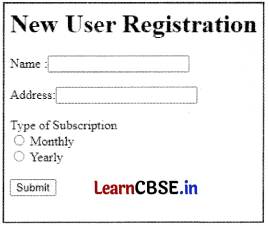
Write code to design the above form. [4]
OR
Write a code in HTML to generate the following table: [4]
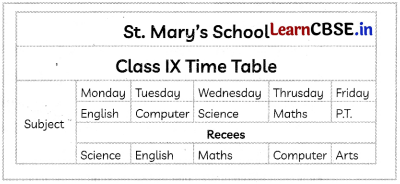
Answer:
<html>
<head>
<title> Registration Form</title>
</head>
<body>
<h1>New User Registration</h1>
<form action= " " method=”post’’>
Name:<input type ="text” id=’’Name”>
<br>
<br>
Address:<input type=”text” id= ”Add”>
<br>
<br>
Type of Subscription
<br>
<input type=”radio’’ name=’’subscription” value=’’month’’> Monthly<br>
<input type="radio’’ name =”subscription’’ value=’’year”> Yearly<br>
<br>
<input type=”Submit” value=”Submit”>
</form>
</body>
</html>
OR
Following is the code:
<html>
<body>
<table border=2 cellspacing=3 cellpadding =5>
<caption><h2><u>St. Mary's School</u></h2></caption>
<tr>
<th colspan=”6”> Class IX Time Table </th>
</tr>
<tr>
<th rowspan="4'' align= center>
Subjects </th>
<th> Monday </th>
<th> Tuesday </th>
<th> Wednesday </th>
<th> Thursday </th>
<th> Friday </th>
</tr>
<tr align= center>
<td> English </td>
<td> Computer</td>
<td> Science</td>
<td> Maths </td>
<td> P.T.</td>
</tr>
<tr align= center>
<th colspan=”5’’> Recess </th> </tr>
<tr align= center>
<td> Science </td>
<td> English </td>
<td> Maths </td>
<td> Computer </td>
<td> Arts </td>
</tr>
</table>
</body>
</html>
SECTION – E (8 Marks)
(4 marks each)
Question 25.
Case Study 1
Aditya is a student of class 10 in St. Joseph’s School. He has been assigned projects for all subjects. In order to search content related to all topics he is making use of Internet.
(A) Name any two web browsers Aditya can use to work on Internet. [1]
(B) Name the web application Aditya should use for searching. [1]
(C) Among DSL and Broadband which one is the faster internet connection that Aditya can use? [1]
(D) In order to use Internet he has to use a web browser. Where can he find a web browser? [1]
Answer:
(A) GoogLe Chrome, MoziLLa Firefox.
Explanation: A web browser or a browser is an application or software used to access and view websites.
(B) Search Engine
Explanation: A search engine is a service that allows Internet users to search for content via the World Wide Web (WWW). A user enters keywords or key phrases into a search engine and receives a list of Web content results in the form of websites, images, videos or other online data that are matched with the search query.
(C) Broadband
Explanation: Broadband is a wide bandwidth transmission that can transmit multiple signals and data over a very high-speed internet connection.
(D) A web browser is installed on a client computer.
Explanation: A web browser is a client side program that retrieves information from the web.
Question 26.
Case Study 2
Rishit is a writer who writes blogs and articles on social causes. For quiet some time he has been observing that his writings or part of it are being published by some other names. He went through the internet to find out what could be done regarding this and found the following information:
The main purpose of intellectual property rights is to encourage the creation of a wide variety of intellectual goods. To achieve this, the law gives people and businesses property rights to the information and intellectual goods they create, usually for a limited period of time, this gives economic incentive for their creation, because it allows people to benefit from the information and intellectual goods they create, and allow them to protect their ideas and prevent copying.
(A) Rishit wants to know what intellectual goods are being referred to in this article. Name any two. [1]
(B) Suggest a method that he can use to protect his intellectual property. [1]
(C) While trying to find solution to his problem, Rishit found out that this was the case with most of the intellectual works. Name a common threat to all types of intellectual property. [1]
(D) Rishit concluded that IPR was a boon to the intellectuals. Write one advantage of intellectual property rights. [1]
Answer:
(A) literary and artistic works, Inventions
Explanation: Intellectual property refers to the creations of one’s mind.
(B) Copyright
Explanation: CopyRight, Patent and Trademark are various ways to prevent IPR violation.
(C) Plagiarism
Explanation: Plagiarism refers to use of someone else’s thought and ideas and presenting them without proper credit or citation to the owner or original creator.
(D) IPR provides exclusive rights to the creator or inventor.