Students must start practicing the questions from CBSE Sample Papers for Class 10 Computer Applications with Solutions Set 6 are designed as per the revised syllabus.
CBSE Sample Papers for Class 10 Computer Applications Set 6 with Solutions
Time Allowed: 90 Minutes
Maximum Marks: 25
General Instructions:
(i) The question paper consists of 16 questions.
(ii) All questions are compusory. However, internal choices have been given in few questions.
SECTION – A
(10 Marks)
Question 1.
Multiple Choice Questions:
(A) <HR> stands for: [1]
(a) High Row
(b) Horizontal Rule
(c) Horizontal Row
(d) High Rule
Answer:
(b) Horizontal Rule.
Explanation: The HR tag produces a horizontal line which spreads across the width of the browser window. Horizontal rules give you a way to separate sections of your document visually.
(B) <A> tag is used to: [1]
(a) Insert an image
(b) Give a heading
(c) Create linking
(d) Both (a) and (c)
Answer:
(c) Create linking
Explanation: The <A> anchor tag in HTML helps the user to incorporate a hyperlink into the web browser which helps to link the hyper text file to another document, file or ideation within the web browser.
A hyperlink is typically activated by clicking on a highlighted word.
(C) Example of Web Services are: [1]
(a) Chat
(b) E-mail
(c) Video Conferencing
(d) All of the above
Answer:
(d) All of the above
Explanation: Web services are the software- based services that take place when two electronic devices connected through a network, that communicate over WWW. The types of services available on the internet are email, searching desired information, video conferencing, storing or retrieving files, participating in discussion forums, etc.

(D) XML tags are: [1]
(a) case sensitive
(b) not case sensitive
(c) Both (a) and (b)
(d) None of the above
Answer:
(a) case sensitive
(E) In HTTP, H stands for: [1]
(a) HYDRO
(b) HYPER
(c) HYPO
(d) HIGHER
Answer:
(b) HYPER
Explanation: HTTP, i.e., Hypertext transfer protocol is the protocol for transferring documents over internet.
HTTP works in combination with WWW, i.e., World Wide Web. The HTTP is responsible for accessing hypertext documents on the World Wide Web.
Question 2.
Rita has just started learning web page designing. Help her in understanding the purpose of <TITLE> tag in web page designing. [1]
Answer:
The title tag contains the document title and identifies its content in a global context. The title is typicaLLy displayed in the title bar at the top of the browser window. It helps the programmer to give a title to his or her document or web page.
Question 3.
Give the example of URL of any one website. [1]
Answer:
http://www.y a h oo.co m
Explanation: The full form of URL is Uniform Resource Locator. A URL refers to an address on the internet. Any documents or multimedia files on the internet can be accessed through their URLs.
Question 4.
What is HTML? [1]
Answer:
HTML is Hyper Text Markup Language. HTML is a document layout and hyperlinks specification language i.e. a Language used to design the layout of a document and to specify the hyperlinks. HTML tells the browser how to display the contents of a hyper text document i.e., a document including text, images and other supporting media.
Question 5.
Which protocol is used for downloading and uploading files from a remote site? [1]3
Answer:
File transfer protocol is used for downloading and uploading files from a remote site. Explanation: FTP, i.e. file transfer protocol server is utilised for downloading and uploading files from a remote site. There are many FTP servers that allow anonymous or guest access onto a remote site.
In order to upload a file remotely on an FTP server you need to copy a file from your computer and paste it to the FTP server’s folder. In order to download a fie from the FTP server, you just need to copy a file from any of the folders of the FTP server and paste it on your computer’s folder.
Question 6.
Write the names of any two websites which provide e-Shopping facility. [1]
Answer:
Myntra and Amazon are two of many websites which provide E-shopping facility.
e-Shopping or online shopping is a process of buying goods and services from merchants who sell on the internet. Shoppers can visit web stores from the comfort of their homes and shop as they sit in front of their computer or any electronic device that has a connection to the Internet.
Question 7.
Write any two points briefly describing the importance of Anti-virus software. [2]
Answer:
Anti-virus products work by detecting, quarantining and/or deleting malicious code, to prevent malware from causing damage to your device. Modern antivirus products update themselves automatically, to provide protection against the latest viruses and other types of malware.
Question 8.
Vani has just started learning about the Internet and its advantages. Explain to her the term E-Learning briefly. [2]
Answer:
E-Learning is the type of learning that takes place in an electronically simulated environment. E-Learning, web-based training, internet-based training and computer-based training are the next- generation instruction methods that are being developed today.
E-Learning can be done using an internet connection, a network, and internet, or a storage disk. It offers many benefits to both the teachers, schools and learners such as-
(1) It is less expensive to provide E-Learning as it is virtually free once the breakeven point is reached.
(2) Learners control the amount of time they spent on any particular topic thereby controlling the speed of course coverage.
Question 9.
Mr. Gaurav, a web designer in Global Designer Pvt. Ltd., needs to create a web page. Suggest him a suitable HTML tag along with the required attributes to draw a horizontal line of red colour. [2]
OR
Observe the screenshot of the web page given below and identify any two main tags of HTML being used to create the list: [2]
| FLOWER |
| 1. ROSE |
| 2. LILY |
| 3. LOTUS |
Answer:
To draw a horizontal line of red colour use: <HR> tag with color attribute, e.g.;
<HR COLOR = “RED”>
OR
Two main tags are as follows:
- <OL> tag with <LI> tag.
- <U> tag for underline.
Question 10.
Differentiate between Text and Number data type with reference to Database Management Tool with the help of a suitable example. [2]
Answer:
Text and number are two different data types in Excel. Text is mainly used for headings, names, descriptions, titles, comments etc., in an Excel Worksheet. Text data is aligned to the left-side of an Excel Cell and the numeric data is aligned to the right-side of an Excel Cell.
Question 11.
Ms. Sonam, working as an IT professional, has got an assignment to make a web page of a travel company. Help her in writing the HTML code to create a table in , HTML as shown in the given screenshot: [3]
| Source | Destination | Charges |
| Dehradun | Delhi | 780 Rs. |
| Delhi | Gorakhpur | 1500 Rs. |
Answer:
<html>
<body>
ctable border= “2"
<tr valign= "middle">
<th><b>Source</b></th>
<th><b>Destination</b></th>
<th><b>Charges</b></th>
</tr>
<tr>
<td>Dehradun</td>
<td>Delhi</td>
<td>780 Rs.</td>
</tr>
<tr>
<td>Delhi</td>
<td>Gorakhpur</td>
<td>1500 Rs.</td>
</tr>
</table>
</body>
</html>
Question 12.
Saloni, a student of Class X, is not able to understand the difference between Web address and e-mail address. Help her in understanding the difference with the help of a suitable example of each. [3]
Answer:
| Web Address | |
| (1) A web address is the address or URL of the location of a web resource. | An e-mail address is used to send and receive e-mail. |
| (2) A web address is of the form
type: //address/ path Here ‘type’ specifies the type of the server, ‘address’ is the address of the server and ‘path’ is the path of the file to be located. |
An e-mail address is of the form username @ hostname. Here username is name of the user and hostname is the name of the e-mail server. |
| (3) e.g., https://www.
discovery.com |
e.g., [email protected] |
Question 13.
Help Rishik in understanding the usage of <H1> <H6> tags with the help of suitable example. [3]
Answer:
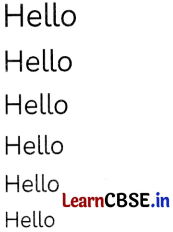
<H1….<H6> are heading tags that are used to display headings of different sizes.
For e.g.;
<H1>Hello</Hl>
<H2>Hello</H2>
<H3>Hello</H3>
<H4>Hello</H4>
<H5>Hello</H5>
<H6>Hello</H6>
Output of the above
Question *14.
Mention any three benefits of ICT in education.
OR
What do you understand by the term Malware? Explain any two points briefly describing malware. [3]
Answer:
Advantages of ICT in education:
- Communication modes have been improved.
- ICT has eliminated the use of paper by going paperless.
- ICT has Improved teaching and learning techniques.
- ICT has reduce costs and save time.
- Management of students is simple because of ICT.
Question *15.
Draw the XML tree for the code given below and also identify the name of root element. [5]
<ELECTRONICS>
<WIRELESS>
<SmartPhone>SpiMi</SmartPhone>
<Remote>FDA</Remote>
</WIRELESS>
<WIRED>
<WashingMachine>Vortex</WashingMachine>
<Television>Panasonic</Television>
</WIRED>
</ELECTRONICS>
Answer:
Not examinable for 2024 exam.
Question 16.
Attempt any one question out of the given two:
Observe the following HTML output and write HTML code to generate it:
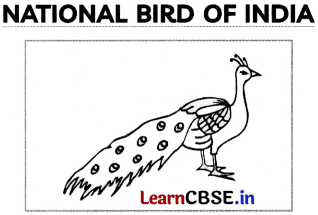
The Indian peacock, Pavo cristatus, the national bird of India, is a colourful, swan-sized bird, with a fan-shaped crest of feathers, a white patch under the eye and long, slender neck.
The male of the species is more colourful than the female, with a glistening blue breast and neck and a spectacular bronze-green tail of around 200 elongated feathers.
The female is brownish, slightly smaller than the male and lacks the tail. The elaborate courtship dance of the male, fanning out the tail and preening its feathers is a gorgeous sight.
Click here to know more….
Write the HTML code to design the above shown web page considering the specifications as given below:
- Background colour of the page should be yellow.
- Image named peacock.jpg should be placed in the centre of the web page.
- Heading “NATIONAL BIRD OF INDIA” should be first level of heading and underlined.
- Paragraph should have the following formatting styles:
- Colour – RED
- Size – 5
- Font style – Times New Roman
- At the bottom of the page, “Click” text should be linked with next.html web page.
OR
Differentiate between <OL> and <UL> tag of HTML with the help of suitable examples. Also give any two attributes of <OL> or <UL> tag. [5]
Answer:
<html>
<head>
<title>lndian Birds</title>
</head>
<body bgcolor= “yellow”>
<center>
<img src = “peacock.jpg”>
<h1><u>NATIONAL BIRD OF INDIA</u></h1>
<font face= "Times New Roman" color= "red" size= "5">
<p>
The Indian peacock, Pavo cristatus, the national bird of India, is a colourful, swan-sized bird, <BR> with a fan-shaped crest of feathers, a white patch under the eye and long, slender neck.
The male of the species is more colourful than the female, <BR> with a glistening blue breast and neck and a spectacuLar bronze-green tail of around 200 <BR> elongated feathers <BR>.
The female is brownish, slightly smaller than the male and lacks the tail. The elaborate <br> courtship dance of the male, fanning out the tail and preening its feathers is a gorgeous <br> sight <br>.
</p>
</font>
<a href = “next.html">Click</a>
here to know more ......
</center>
</body>
</html>
OR
<OL> tag in HTML is used for ordered lists, these are indented lists that have numbers or letters in front of each item. The <OL> tag takes attributes type and start.
For e.g.;
<OL>
<LI> AppLe
<LI> Orange
<LI> Mango
</OL>
Output:
- Apple
- Orange
- Mango
<UL> tag in HTML is used for unordered lists, these are indented lists having a special bullet symbol in front of each item.
For e.g.;
<UL>
<LI> Grapes
<LI> Guava
<LI> Papaya
</UL>
Output:
- Grapes
- Guava
- Papaya