Students must start practicing the questions from CBSE Sample Papers for Class 10 Computer Applications with Solutions Set 5 are designed as per the revised syllabus.
CBSE Sample Papers for Class 10 Computer Applications Set 5 with Solutions
Time Allowed: 90 Minutes
Maximum Marks: 25
General Instructions:
- (i) This question paper contains two parts A and ft Each part is compulsory.
- Part-A carries 20 marks while part B carries 30 marks.
- Part-A consists very short answer and case based MCQ Questions and Part-B is Descriptive Paper.
- Both Part A and Part B have choices.
Part – A:
- It consists two sections-1 and II.
- Section I has 13 questions of very short answer type. An examinee is to attempt any 10 out of 13 questions.
- Section II has two case studies. Each case study has 7 case-based sub-parts. An examinee is to attempt any 5 out of 7 sub-parts.
Part – B:
- Question No. 16 to 20 are short answer Type (SA-I) questions of 2 mark each, Question No 21 to 25 are Short Answer Type (SA-II) questions of 3 marks each and Question No 26 is Long Answer Type question of 5 marks.
- Internal choice is provided in 1 question of 2 marks, 1 question of 3 marks and 1 question of 5 marks.
PART – A
SECTION – I (10 marks)
(This section consists of 13 questions of very short answer type. Question no. 4 to 8 are of ‘fill in the blank type. Fill the blank with the most appropriate answer. Attempt any 10 questions from Question No. 1 to 13.)
Question 1.
What is a Homepage? [1]
Answer:
The default (first) page of a website is called a Homepage.
Explanation: Every website has a homepage. It is the first web page that appears when viewers go to a website. Homepage sets the looks and feel of the website and directs viewers to the rest of the pages in the website.
Question 2.
Which heading element gives the most prominent headings? [1]
Answer:
<H1>
Explanation: HTML has six levels of headings numbered 1 through 6. with 1 being the largest. Headings are typically displayed in larger and/or bolder fonts than normal body text.
For eg. <H1> Headings in HTML </H1>
Question 3.
Give one use of anchor tag. [1]
Answer:
Anchor tag is used to create hyperlinks.
Explanation: A hyperlink is a link from a hypertext file to another document, file or location. A hyperlink in HTML is created using tag <A>, which stands for anchor tag.
For eg. <A href= “mybook.html”> Book </A>, this entry makes the word Book the hyperlink to the document mybook.html, which means on clicking ‘Book’, the document mybook.html gets opened.
Question 4.
………… tag is used for a horizontal line. [1]
Answer:
<HR>
Explaination: The default rule is drawn across the full width of the view window. The length of the horizontal rule can be controlled with width attribute. The value of width attribute can either be an absolute number or a certain percentage of the browser window’s width.
Question 5.
An empty HTML element has a tag but no tag. [1]
Answer:
start, end
Explanation: in HTML there are two types of elements – one that requires a starting as well as an ending tag, and another that requiresjust a starting tag and not an ending tag. These two types are known as container and empty tags respectively.
Question 6.
…………… tag creates a bulleted list. [1]
Answer:
<UL>
Explanation: The unnumbered or unordered lists are called bulleted lists. These lists are marked by <UL> and </UL> tags.
Question 7.
The code for inserting an image in an HTML page is <img src=” ” alt=” “>. The alt attribute is used for [1]
Answer:
specifying alternate text for the image
Explanation: The ALT attribute specifies the alternative text that the browser may show if displaying the image is not possible or ‘ disabled by the user.

Question 8.
Ravi was trying to log-in to his net- banking account. He noticed that the URL . of the net banking starts with ‘https’. The ‘s’ in ‘https’ stands for [1]
Answer:
Secure
Explanation: HTTPS is another text exchange protocol also known as Hypertext Transfer Protocol Secure and it ensures security of the text or information being transferred over the World Wide Web. With regular HTTP protocol the information flows from server to browser directly, without any encryption. Whereas, HTTPS works with SSL (Secure Sockets Layer) that helps create a secure and encrypted connection between server and browser.
Question 9.
Sarita is designing a webpage and wants to change the name of the font (font-type) for certain text. Which attribute of the FONT tag she should use. [1]
Answer:
face
Explanation: The <FONT> tag in HTML lets you change the size, style and colour of the text. The font type of the text to be displayed can be changed using the FACE attribute. With the FACE attribute a list of font names is provided, enclosed within quotes.
For eg. <FONT face = “Times new roman” > my first web page </FONT>
Question 10.
What is the use of <br> tag in HTML Code? [1]
Answer:
<br> tag is used to insert a single line break in a HTML Document.
Explanation: The <BR> tag is known as the line break tag. It inserts a single line break on the web page. It is an empty tag, meaning it has no end tag. It shifts the text after it to a new line without inserting a blank line in between.
Question 11.
What is the significance of the URL? [1]
Answer:
URL specifies the unique address of each document on the internet.
Explanation: A location on a net server is called a website. Each website has a unique address called URL i.e., Uniform Resource Locator. A URL is also referred to as Web Address.
Question 12.
What is the importance of vlink attribute of <BODY> tag? [1]
Answer:
vlink attribute specifies the color of visited links in a document
Explanation: The <BODY> tag defines the document’s body which thereby defines all contents of the HTML document. Following table summarizes attributes of<BODY> tag:
Table 1
Question 13.
What is the method of using comment line in the HTML code? [1]
Answer:
<!- Any text –>
Explanation: A comment in HTML allows developers to leave notes about their code, its functionality or to indicate necessary changes for the future. To comment, in HTML <! — –> tag is used.
e.g. <!-This is a comment line –>
SECTION – II
(Both the Case study based questions are compulsory. Attempt any 5 questions (out of 7 questions) from each case study. Each question carries 1 mark.)
Question 14.
Internet Protocols
For communication over the Internet, the communicating devices must follow certain rules. These rules are called Internet protocols. For email communication, we use SMTP and POP. For communication between browser and server ITTTP and HTTPS protocols are used. We can use TELNET to access services available on a remote computer. [1 × 5 = 5]
(A) Which of the following is an Internet Protocol? [1]
(a) HTTP
(b) FTP
(c) both (a) and (b)
(d) None of the above
Answer:
(c) both (a) and (b)
Explanation: HTTP (Hypertext Transfer Protocol) is a set of rules for transferring hypertext i.e., text, image, graphic, sound, video etc. on WWW (World Wide Web).
FTP (File Transfer Protocol) is a set of rules for exchanging files over any network (internet or intranet).
(B) SMTP protocol is: [1]
(a) used for composing an email message.
(b) used in receiving incoming emails by pulling the message from server to client
(c) used in sending outgoing emails by pushing the message from client to server
(d) None of the above
Answer:
(B) (c) used in sending outgoing emails bg pushing the message from client to server
Explanation: SMTP (Simple Mail Transfer Protocol) is a communication protocol for electronic mail transmission. It moves your email on or across networks.
(C) POP protocol is: [1]
(a) used for composing an email message.
(b) used in receiving incoming emails by pulling the message from server to client.
(c) used in sending outgoing emails by pushing the message from client to server.
(d) None of the above
Answer:
(b) used in receiving incoming emails bg pulling the message from server to client
Explanation: POP (Post Office Protocol) is a type of .internet protocol that extracts and retrieves email from a remote mail server for access by host machine.
(D) Which of the following internet protocols provides secure data transmission between server and browser with the help of encryption? [1]
(a) HTTP
(b) HTTPS
(c) TELNET
(d) ARPANET
Answer:
(b) HTTPS
Explanation: HTTPS works with SSL (Secure Sockets Layer) that helps create a secure and encrypted connection between server and browser.
(E) The full form of POP (email protocol) is: [1]
(a) Post Order Protocol
(b) Push Order Protocol
(c) Post Office Protocol
(d) Pull Over Protocol
Answer:
(c) Post Office Protocol
(F) Which of the following protocols is used for delivering data from the source to the destination? [1]
(a) TCP
(b) IP
(c) SMTP
(d) ARPANET
Answer:
(b) IP
Explanation: The Internet Protocol (IP) is the protocoL by which data is sent from one computer to another on the Internet. Each computer on the internet, known as host, has at-least one IP address that uniquely identifies it from all other computers on the internet.
(G) The Full Form of SMTP is: [1]
(a) Secure Mail Transfer Protocol
(b) Secure Mail Transmit Protocol
(c) Simple Mail Transmit Protocol
(d) Simple Mail Transfer Protocol
Answer:
(d) Simple Mail Transfer Protocol
Question 15.
Secure data transmission
Secure data transmission means that data/ information is not being received or modified by an unauthorized person, over a network, from source to destination. For secure data transmission, we can convert an actual message (which is in readable form) into an unreadable message (called an encrypted message) with the help of the concept of encryption. This unreadable message is sent through the network to the destination. If a hacker tries to read this message, he/ she receives an unreadable message that cannot be easily converted into the actual message. The unreadable message can be converted to the original message by the receiver at the destination.
Caesar Cipher is one of the common encryption techniques. In this technique, each letter of the word is replaced by a letter, some fixed number of positions (usually called as key) down the alphabet. For example, if the key is 3, each A’ will be replaced by ‘D’ (Letter ‘D’ is 3 positions down Letter ‘A’ in the alphabet), each ‘B’ will be replaced by ‘E and similarly, each ‘Z’ will be replaced by ‘Cl The receiver can identify the original message by using the reverse technique of encryption. This reverse technique is called decryption. [1 × 5 = 5]
(A) Secure data transmission means: [1]
(a) Data can be accessed by any unauthorized person during transmission.
(b) Data can not be accessed by any unauthorized person during transmission.
(c) Transmission of data
(d) None of the above
Answer:
(b) Data can not be accessed bg ang unauthorized person during transmission.
Explanation: Secure Data Transmission means applying enough technical safeguards so that data travels safely to its target. To ensure secure data transmission techniques like data encryption and SSL (Secure Sockets Layer) are used.
(B) Which of the following techniques can be used for security of data? [1]
(a) Authentication
(b) Authorisation
(c) Encryption
(d) All of the above
Answer:
(d) All of the Above
Explanation: In Authentication the user or computer has to prove its identity to the server or client. Authorization is a process by which a server determines if the client has permission to access or use a file. Encryption involves the process of transforming data so that it is unreadabLe by anyone who does not have a decryption key. It reduces the risk of data interception during transmission.
(C) Caesar Cipher is: [1]
(a) used for conversion of the actual message into an encrypted message
(b) an encryption technique
(c) both (a) and (b)
(d) None of the above
Answer:
(c) both (a) and (b)
Explanation: Caesar Cipher is one of the most widely known encryption technique in which a letter in a plain text is replaced by a letter with some fixed number of positions down the alphabet. For eg. With a left shift of 2 D would be replaced by B, E would become C and so on.
(D) Person ‘X’ has received an encrypted j message and wants to convert this message into the actual message (message before encryption). The technique he should use is called: [1]
(a) Conversion
(b) Encryption
(c) Decryption
(d) None of the above
Answer:
(c) Decryption
Explanation: The conversion of encrypted data into its original form is called decryption.
(E) A sender wants to send a message having the text as ‘COMPUTER.’ to a receiver using 4 as the key. What will be the encrypted message? [1]
(a) GSQTZXIV
(b) GSQTYXIV
(c) GSXTYXIV
(d) GSQSYXIV
Answer:
(b)GSQTYXIV
Explanation: Replace each letter of the word with the 4th letter after it in alphabet. Like C awith G and O with S and so on.
(F) An encryption algorithm is used to transform a readable message into: [1]
(a) Text message
(b) Simple message
(c) Converted message
(d) Encrypted message
Answer:
(d) Encrypted message
Explanation: Encryption is process that converts information into secret code and the formulas used to encode or decode these messages are called encryption algorithms.
The encryption algorithms are also known as ciphers.
(G) In Caesar Cipher, for which of the following values of key, the encrypted message will be the same as the original message. [1]
(a) 0
(b) 26
(c) both (a) and (b)
(d) None of the above
Answer:
(c) both (a) and (b)
Explanation: The Caesar Cipher is the technique of data encryption in which the alphabets are shifted by the key value. Shifting by 0 or 26 will result in the same letter as that of the original text.
PART – B (30 Marks )
(All questions are compulsory. In case of internal choices, attempt any one.)
Question 16.
Sarvesh, a student of Class X, is not able to understand the difference between web client and web-server. Help him in understanding the same by explaining their role and giving suitable examples of each. [2]
Answer:
Web-Client : An application (Web Browser, Chatting Program, etc.) that requests for services from a web-server. Example: Web Browsers, Chatting Applications
Web-Server : Web-server is a software (or any dedicated computer running this software) that serves the request made by web-clients.
Example: Apache Server
Question 17.
Write the full form of Cc and Bcc (used in email communication). Explain the difference between them. [2]
Answer:
Cc: Carbon Copy: every recipient can check who else has received the mail.
Bcc: Blind Carbon Copy: no recipient can check who else has received the mail.
Explanation:
Cc : Cc stands for Carbon Copy. Here you can specify one or more mail addresses of those to whom you want to send a copy of the message. The Cc recipient’s name is visible to all recipients.
Bcc: Bcc stands for Blind Carbon Copy. This is also a list of addresses but a Bcc recipient’s name is not visible to other recipients.
Question 18.
What is the use of <sub> and <sup> tag. Explain with a suitable example. [2]
Answer:
<sub> : defines subscripted text
<sup> : defines superscripted text Example:
To write a2: a<sup>2</sup>
To write CO2: CO<sub>2</sub>
Explanation: <sub> tag defines subscripted text. The text appears half a character below the normal line. These can be used to write chemical formulas like H2O.
<sup> tag defines superscripted text. The text appears half a character above the normal line. It can be used to write exponent values like 10-5
Example:
To write H2O: H<sub>2</sub>O
To write 10-5: 10<sup>-5</sup>
Question 19.
Sunil wants to insert an image ‘elearning. jpg’ into a webpage. Write the name and the syntax of the HTML Tag he should use. The alternate text for the image should be ‘E-learning Image’. [2]
Answer:
Name of Tag : Image Tag (<img>)
Syntax of Tag :<img src = “elearning. jpg” alt = “E-learning image”>
Question 20.
Define the following:
(A) Intellectual Property Rights
(B) Plagiarism
OR
What is e-commerce? Write any two preventive measures to be taken for secure online transactions. [2]
Answer:
(A) Intellectual Property Rights: rights given to creators for creations of their minds.
Explanation: Intellectual property rights are the rights of the owner or the developer of the information. And it is the owner or the developer who has the right to decide how much of the information is to be exchanged, shared or distributed among the masses. Also it gives the right to the owner to decide the price for doing so.
(B) Plagiarism: taking credit of ideas/words of another person
Explanation: Plagiarism is stealing someone else’s intellectual work and representing it as your own work without citing or giving credit to the source of information.
OR
e-commerce: Buying and selling of goods on the internet
Two preventive measures for secure online transaction:
(1) Never share OTP with anyone.
(2) Before making an online payment, ensure that connection is secure (HTTPS).
Explanation: e-commerce or electronic commerce refers to commercial transactions conducted electronically on the internet. It includes buying and selling of goods or services using the internet and the transfer of money and data to execute these transactions.
Question 21.
Shalini, a web designer, wants to create a webpage to display a list where each item is listed by a number. Which type of list she should use? Explain the role of start and type attributes. [3]
Answer:
Ordered List Role:
Start Attribute: specifies the start value of an ordered list
Type Attribute: specifies the type of the list item marker
Explanation:
Ordered lists are indented lists that have numbers or alphabets in front of each item.
These can be created using the <0L> tag. The items of the list are tagged with <LI>and they appear numbered using 1, 2, 3… etc. on the browser window.
eg.,
<OL>
<LI> Rose
<LI> Lotus
<LI> Jasmine
</OL>
The type attribute can have values A’, ‘a’, T, T etc. The list will be numbered accordingly.
The start attribute specifies the start value of the list. e.g. start = 4, will start the list numbering from 4.
Question 22.
What are the roles of Rowspan and Colspan attributes? Explain with a suitable HTML example. [3]
Answer:
Rowspan: Combines Cells vertically Colspan: Combines Cells horizontally Example:
<table border = T>
<tr>
<td>Row-l Column-l</td>
<td colspan="2">Row-l Column-2 and 3</td>
<td rowspan="2">Row-l and 2 Column-4</td>
</tr>
<tr>
<td>Row-2 Column-l</td> <td>Row-2 Column-2</td> <td>Row-2 Column-3</td>
</tr>
</table>
Explanation: The rowspan and colspan attributes are used with the <TD> tag while creating tables in the HTML document. These are used to specify the number of rows and columns a cell should span. The rowspan attribute is for rows and colspan is for columns. These attributes have numeric values. For ex. Colspan = 5 will span 5 columns.
Question 23.
Saroj, a student of Class X, wants to represent a table in a webpage but she is unaware about the table tag. Explain her the role of <th>, <tr> and <td> tags. Write HTML code of a table and show the use of <th>, <tr> and <td> tags. [3]
Answer:
<tr> : defines table row.
<th> : defines table header.
<td> : defines table data/cell.
HTML Code:
<table>
<tr>
<th>Roll Number</th>
<th>Name</th>
<th>Stream</th>
</tr>
<tr>
<td>1</td>
<td>Ajay</td>
<td>Arts</td>
</tr>
<tr>
<td>2</td>
<td>Vijay</td>
<td>Commerce</td>
</tr>
<tr>
<td>3</td>
<td>Ramesh</td>
<td>Commerce</td>
</tr>
</table>
Explanation: The HTML table allows you to arrange data into rows and columns of cells. <table> tag is used to define a table. <tr> defines the rows of the table. <th> defines the header of the columns and <td> defines the data cells. There are some other tags also. <caption> defines the title or caption of the table. You can also use <thead>, <tbody> <tfoot> tags to define and control the sections of the table.
Question 24.
What is the digital divide? Write any two reasons for digital divide in India. [3]
Answer:
Digital Divide refers to the differing amount of information between those who have access to ICT and those who don’t have access.
Reasons:
- Due to the unequal distribution of wealth, poverty is higher in rural areas
- Less Literacy rate in rural India
Question 25.
Define Internet and write its two uses in our daily life. How is it different from the World Wide Web (www)?
OR
What is e-learning? Explain any two merits of e-learning. [3]
Answer:
The Internet is a worldwide network that links many smaller computer-networks.
Uses of the internet
- e-learning
- e-commerce
The difference between the internet and WWW
WWW: It is a collection of various hypertext documents available over the internet. WWW is a part of the internet.
Internet: A worldwide network that provides various other services (apart from WWW) like email-communication, File sharing, etc.
OR
e-learning: learning through the courses which are delivered online.
Benefits:
- Self Paced (Learn at your speed).
- We can attend classes at any time and any where.
Question 26.
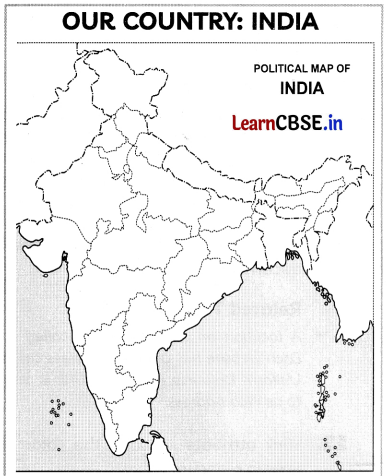
India is spread over a large geographical area. In terms of area, it is the 7th largest country while in terms of population, it is the 2nd largest country in the world. Some facts about India are as follows:
- Area: Approx 3.28 million sq. km.
- North to South extension: Approx 3,200 km.
- East to West extension: Approx 2,900 km.
Write the HTML code to design the above-shown web page considering the specifications as given below:
- Background color of the page should be yellow.
- Heading ‘Our Country : India’ should be the first level of heading
- The image named ‘India.jpg’ should be placed at the center.
- Formatting style for the paragraph
- Font Size: 5
- Font Name: Times New Roman
- Color: Red
- Superscript and subscript tags should be used wherever required.
- Facts (as shown in the above webpage) should be written with the help of the unordered list.
OR
Answer the following:
(A) What is a Hypertext link?
(B) Give the name and the syntax of the HTML Tag which is used for creating a Hypertext Link.
(C) Neha wants to display a ‘Click Here’ message on her webpage which, when clicked, opens a new webpage ‘Chapter2.html’. Write the syntax of the HTML command she should use.
(D) On the same webpage, Neha whose email is [email protected], wants to display a ‘Contact us’ message which when clicked open the email program and allows the user to send a mail to Neha. Write the syntax of the HTML command she should use.
(E) Explain the use of the target attribute in the Hypertext Link Tag. [5]
Answer:
<html>
<body bgcolor="yellow">
<center>
<h1> Our Country : India </h1>
<imgsrc="india.jpg">
</center>
<p>
<font color="red" size="5" face="Times New Roman">
India is spread over a large geographical area. In terms of area, it is the 7<sup>th</ sup> largest country while in terms of population, it is the 2<sup>nd</sup> largest country in the world. Some facts about India are as follows</font></p>
<ul>
<li>Area :Approx 3.28 million sq. km </li>
<li>North to South extension :Approx 3,200 km</li>
<li>East to West extension :Approx 2900 km</li>
</ul>
</body>
</html>
OR
(A) Hyperlink allows us to link HTML elements (text and/or image) to another document or new section within the current document.
(B) Name: anchor tag, Syntax <a href=”Link Address”>Hyperlink Text</a>
(C) <a href=”Chapter2.html”> Click Herec </a>
(C) <a href=”Chapter2.html”> Click Herec </a>
(D) <a href=”mailto:[email protected]”>
Contact us</a>
(E) Specifies where to open the linked document when the link is clicked.