CBSE Class 12 Informatics Practices Notes Chapter 11 SQL Functions and Table Joins Pdf free download is part of Class 12 Informatics Practices Notes for Quick Revision. Here we have given NCERT Class 12 Informatics Practices Notes Chapter 11 SQL Functions and Table Joins.
CBSE Class 12 Informatics Practices Notes Chapter 11 SQL Functions and Table Joins
SQL Functions
A function is a set of predefined commands that performs specific operation and returns a single value.
The functions used in SQL can be categorised into two categories namely single row or scalar functions and multiple row or group or aggregate functions.
1. Single Row Functions
The single row functions work with a single row at a time and return one result per row. e.g.
String, Number, Date, Conversion and General function are single row functions.
(i) String Functions
The string functions of MySQL can manipulate the text string in many ways. String functions are broadly divided into two parts:
(a) Case-manipulation functions.
(b) Character-manipulation functions.
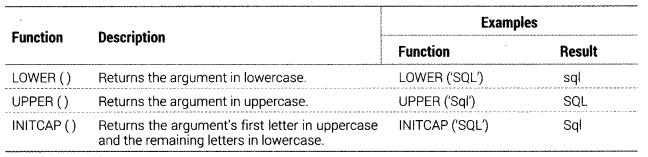
(a) Case-manipulation Functions
These functions convert case for character strings:
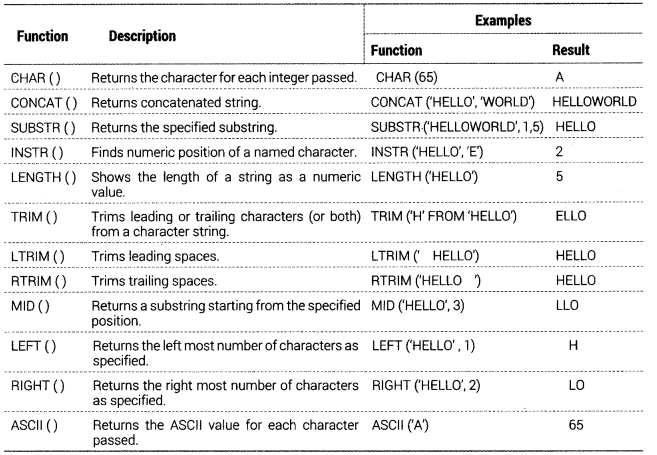
(b) Character-manipulation Functions
These functions manipulate character strings:
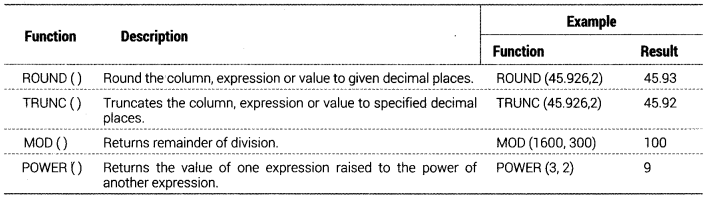
(ii) Mathematical Functions
Mathematical functions are also called number functions that accept numeric input and return numeric values.
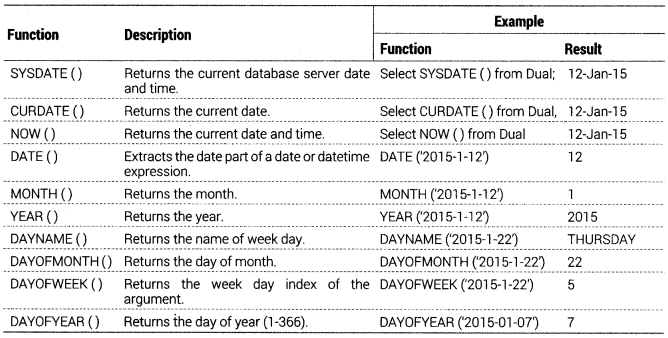
(iii) Date and Time Functions
Date functions operate on values of the DATE data type:
2. Multiple Row Functions
Such types of functions work with the data from more than one rows. Such type of functions are returning aggregate values. Examples of aggregate functions are sum( ), count( ), max( ), min( ), avg( ), etc.
Aggregate Functions in MySQL
MySQL also supports and provides group functions or aggregate functions. As you can make out that the group functions or aggregate functions work upon groups of rows, rather than on single rows. That is why, these functions are also called multiple row functions.
GROUP (Aggregate) Functions
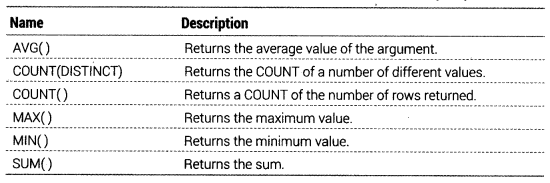
There are following aggregate or group functions available in MySQL:
SELECT [Column] group-function (Column), ...
[ORDER By Column] FROM table [WHERE Condition]
[GROUP BY Column];
This section describes group (aggregate) functions that operate on sets of values. Unless otherwise stated, group functions ignore NULL values.
If you use a group function in a statement containing no GROUP BY clause, it is equivalent to grouping on all rows.
(i) AVG ([DISTINCT]expr) Returns the average value of expr. The DISTINCT option can be used as of MySQL to return the average of the distinct values of expr.
AVG() returns NULL, if there were no matching rows.
e.g. mysql> SELECT AVG(test_score)
FROM STUDENT;
(ii) COUNT(expr) Returns a count of the number of non NULL values of expr in the rows retrieved by a SELECT statement. The result is a BIGINT value.
COUNT() returns 0, if there were no matching rows.
e.g. mysql> SELECT C0UNT(*)
FROM STUDENT,COURSE
WHERE student.student_id = course.student_id;
COUNT(*) is somewhat different in that it returns a count of the number of rows retrieved, whether or not they contain NULL values.
COUNT(*) is optimised to return very quickly, if the SELECT retrieves from one table, no other columns are retrieved and there is no WHERE clause.
e.g. mysql> SELECT C0UNT(*) FROM STUDENT;
The query would give you the output, total number of rows in STUDENT table.
(iii) COUNT( [DISTINCT] expr) Returns a count of the number of rows with different non NULL expr values.
COUNT(DISTINCT) returns 0, if there were no matching rows.
e.g. mysql> SELECT COUNTCDISTINCT results) FROM STUDENT;
In MySQL, you can obtain the number of distinct expression combinations that do not contain NULL by giving a list of expressions. In standard SQL, you would have to do a concatenation of all expressions inside COUNT(DISTINCT …).
(iv) MAX([DISTINCT|All] expr) Returns the maximum value of expr. MAX() may take a string argument; in such cases, it returns the maximum string value. The DISTINCT keyword can be used to find the maximum of the distinct values of expr, however, this produces the same result as omitting DISTINCT.
MAX() returns NULL, if there were no matching rows.
e.g. mysql> SELECT MAX(test_score)
FROM STUDENT;
(v) MIN([DISTINCT|All]expr) Returns the minimum value of expr. MIN( ) may take a string argument; in such cases, it returns the minimum string value. The DISTINCT keyword can be used to find the minimum of the distinct values of expr, however this produces the same result as omitting DISTINCT.
MIN() returns NULL, if there were no matching rows.
e.g. mysql> SELECT MIN(test_score)
FROM STUDENT;
(vi) SUM([DIST1NCT All]expr) Returns the sum of expr. If the return set has no rows, SUM() returns NULL. The DISTINCT keyword can be used to sum only the distinct values of expr.
e.g. mysql> SELECT SUM (test_score)
FROM STUDENT;
The GROUP BY Clause
The GROUP BY clause combines all those records that have identical values in a particular field or a group of fields.
We can group by a column name or with aggregate functions in which case the aggregate produces a value for each group.
e.g. SELECT City, COUNT!*)
FROM CUSTOMERS GROUP BY City;
(i) Nested Groups With GROUP BY clause we can create nested groups, i.e. groups within groups. For a nested group, we have to follow these steps:
- In the GROUP BY expression, we have to specify the first field determining the highest group level.
- The second field determines the second group level.
- Similarly, other groups till the last field, which specifies the lowest level of grouping.
e.g.
SELECT Region, City, COUNTS)
FROM CUSTOMERS
GROUP BY Region, City;
(ii) The HAVING Clause HAVING clause was added to SQL, because the WHERE keyword could not be used with aggregate function.
e.g.
SELECT City.COUNT(*)
FROM CUSTOMERS
GROUP BY City
HAVING BALANCE>10000;
The HAVING clause can contain either a simple boolean expression (i.e. a condition which results into true or false) or use aggregate function in the having condition.
JOIN
A JOIN is a query through which we can extract queries from two or more tables. It means, it combines rows from two or more tables. Rows in one table can be joined to rows in another table according to common values existing in corresponding columns.
e.g.
SELECT * FROM CUSTOMER, SUPPLIER;
There are various types of joins:
1. EQUI-JOIN
In an EQUI-JOIN operation, the values in the columns are being joined and compared for equality. All the columns in the tables being joined are included in the results, e.g. Two tables EMPLOYEES and DEPARTMENTS are given below:
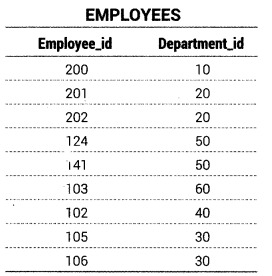

To determine an employee’s department name you compare the value Department_id column in the EMPLOYEES table with Department_id values in the DEPARTMENTS table. The relationship between the EMPLOYEES and DEPARTMENTS tables is an equi-join that is, values in the Department_id column on both tables must be equal.
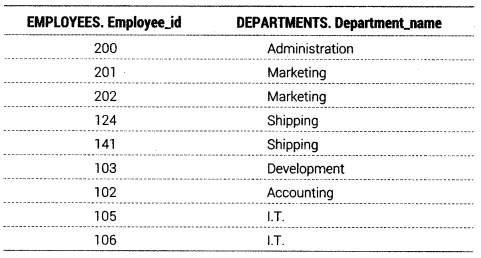
To determine employee’s department name, we need to write following query:
SELECT EMPLOYEES.Employee_id, DEPARTMENTS.Department_name
FROM EMPLOYEES, DEPARTMENTS
WHERE EMPLOYEES. Department_id = DEPARTMENTS. Department_Id;
Output
2. Non-Equi Join
A non-equi join is a join condition containing something other than an equality operator, e.g. there are
two given tables EMPLOYEES and JOB_GRADES
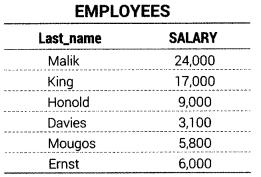

The relationship between the EMPLOYEES table and JOB_GRADES table has an example of a non-equi join. A relationship between the two tables is that the SALARY column in the EMPLOYEES table must be between the values in LOWEST_SAL and HIGHEST_SAL columns of the JOB_GRADES table. The relationship is obtained using an operator other than equals (=).
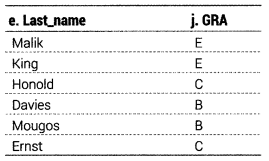
To determine the employees grade according to salary, we need to write following query:
SELECT e.Last_name, j.GRA FROM EMPLOYEES e, JOELGRADES j
WHERE e.SALARY BETWEEN j.LOWEST_SAL AND j.HIGHEST SAL;
Output
3. Natural Join
Usually the result of an equi-join contains two identical columns. Here by restarting the query, we can eliminate one of the two identical columns. It is known as Natural Join.
We can also join two tables using the natural join using NATURAL JOIN clause.
SELECT * FROM <tablel> NATURAL JOIN <table2>; e.g. there are two given tables FOOD and COMPANY:
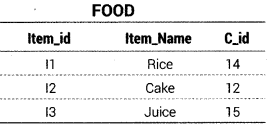
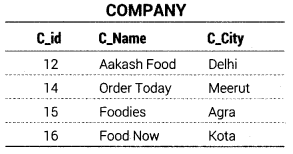
The relationship between the FOOD table and COMPANY table has an example of a Natural Join. To get all the unique columns from FOOD and COMPANY tables, the following sql statement can be used.
e.g.
SELECT * FROM FOOD
NATURAL JOIN COMPANY;
Output

Cartesian Product
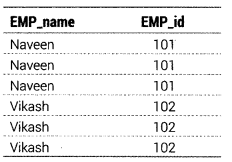
The cartesian product is a binary operation and is denoted by (x). The degree of new relation is the sum of the degrees of two relations on which cartesian product is operated. The number of tuples, of the new relation is equal to the product of the number of tuples, of the two relations on which cartesian product is performed.
e.g. if A = {1, 2, 3} and B = {a, b, c}, find A x B.
A x B = ((1, a), (1, b), (1, c), (2, a), (2, b), (2, c), (3, a), (3, b), (3, c))
In sql, the CROSS JOIN or CARTESIAN JOIN is used to produce the cartesian product of two tables. The cartesian product is a basic type of join that matches each row from one table to every row from another table.
e.g. Consider the following EMPLOYEES and DEPARTMENTS tables:
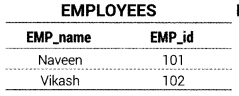
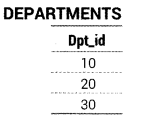
To get the cartesian product, the following sql statement can be used:
SELECT EMP_name, EMPjd
FROM EMPLOYEES
CROSS JOIN DEPARTMENTS:
Output
We hope the given CBSE Class 12 Informatics Practices Notes Chapter 11 SQL Functions and Table Joins Pdf free download will help you. If you have any query regarding NCERT Class 12 Informatics Practices Notes Chapter 11 SQL Functions and Table Joins, drop a comment below and we will get back to you at the earliest.